Capture You: Microphone Array inside MemoMind One
You say, "Hi, Memo," on a busy train station platform. To you, it's a few words. To the MemoMind One's microphones, it's everything at once — your voice, announcements, nearby conversations, footsteps. Before MemoMind One can hear you clearly, it first has to capture all of that.
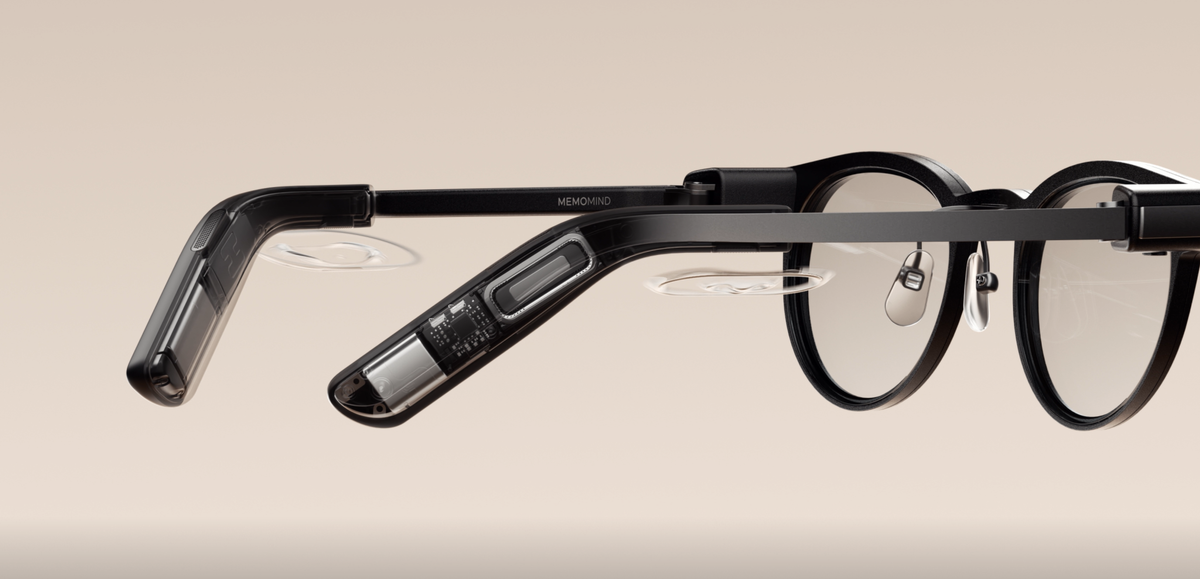
With three high-sensitivity microphones built into its titanium temples, MemoMind One forms a microphone array that captures sound from different positions. While a single microphone hears only one version of a sound, three microphones capture slightly different versions of that same sound. MemoMind One’s audio AI then processes these inputs, ultimately filtering out the specific sound you intend for the device to hear.
Hear You: Smart Audio Glasses Pick Up Your Voice
The MemoMind Audio AI, which is MemoMind's self-developed edge-side intelligent acoustic system, analyzes the sound field environment in real time to precisely extract the wearer's voice.

Step 1: Find Your Voice
AI Beamforming uses the tiny timing differences between multiple microphones to narrow the system's attention toward the direction you're speaking from, making your voice easier to pick out of it.
The beam itself adapts to what you're doing: in Meeting mode it widens to pick up far-field voices up to about 5 meters away; in Translation mode it narrows to the person speaking directly in front of you; in AI Conversation mode it focuses on the wearer's own voice.
Step 2: Filter Out the Noise
Once the system knows where to listen, it still has to deal with everything else.
Environmental Noise Cancellation (ENC) helps reduce background sounds such as chatter, nearby speech, and steady hums during calls. Ambient Noise Reduction (ANR) handles broader environmental noise in everyday situations, while Wind Noise Reduction helps suppress the low-frequency turbulence created when wind hits the microphones.
There's another potential source of interference: the glasses themselves. When audio from the speakers is picked up by the microphones again, Acoustic Echo Cancellation (AEC) helps remove that feedback and prevent it from becoming an echo.
Step 3: Keep Your Voice Clear
Your voice doesn't stay at exactly the same volume all the time. You might speak quietly in a meeting and raise your voice outdoors.
Automatic Gain Control (AGC) automatically adjusts the captured voice level to keep your speech more consistent. Meanwhile, Multi-scene Audio Optimization adapts voice processing to different environments, helping balance vocal volume and clarity whether you're indoors or outside.
This is the input side of MemoMind's acoustic system — hearing your voice accurately before anything gets processed. Paired with the output side: your voice going in cleanly, and the MemoMind One minimizes sound leakage to those around you.
Understand You: From Speech Recognition to AI Response
In a noisy train station, capturing your voice is merely the first step for the MemoMind One audio processing system; what truly matters is the audio AI's ability to accurately understand you:

Step 1: Wake Up
MemoMind One continuously listens at low power for the wake word "Hi, Memo." On-device wake word detection activates the full voice pipeline only when you call for it, without continuously streaming raw audio elsewhere.
Step 2: Detect Speech
Once activated, AI Voice Activity Detection (VAD) helps the system tell speech apart from everyday sounds such as a cough, a closing door, or background music. This helps prevent irrelevant sounds from being mistaken for speech and avoids unnecessary processing.
Step 3: Separate Voices
In a meeting, café, or other busy environment, more than one person may be speaking at once. Speaker separation helps distinguish your voice from nearby conversations, giving the AI a cleaner signal to work with.
Step 4: Respond Fast
Understanding your words is only half the experience. A low-latency voice pipeline keeps each stage of processing tightly connected, reducing the delay between when you finish speaking and when the assistant responds—so the interaction feels more natural.
Together with continuously optimizing the quality of speech pre-processing, improve the comprehension accuracy of ASR and AI models, enabling MemoMind One display glasses to maintain stable and natural human-machine interaction even in complex environments — no need to repeat yourself again and again.
Recognize You: Voiceprint Privacy in MemoMind's Audio Glasses
Today's MemoMind Audio AI is focused on one goal: helping the glasses hear you more accurately. The next layer we're building goes a step further — not just hearing a voice clearly, but recognizing whose voice it is:
-
Voiceprint recognition – identifies the wearer by unique vocal characteristics, similar to how a fingerprint identifies a person. In the Privacy module on the MemoMind App, once your voiceprint is enrolled, wishes, to-dos, meeting recordings, and memory entries are only attributed to you when the voiceprint matches — so if someone standing next to you says "I want a Switch," it won't get logged as your wish. And in meeting recordings, whatever you say gets tagged "Me."
-
User identity confirmation – ensures the assistant is responding to its actual wearer, not to ambient conversation nearby.
The future of MemoMind camera-free AI glasses lies in continuously refining the audio experience, making voice a more natural and intuitive way for people to interact with AI.
FAQs
Can MemoMind One hear me clearly?
Yes, MemoMind Audio AI is designed to hear you clearly. It is an intelligent acoustic system that employs AI to drive the entire audio processing chain to ensure voice interaction in environments ranging from offices and coffee shops to outdoor settings.
Is my voice processed on-device or in the cloud?
MemoMind One performs key parts of its audio processing on-device, including portions of directional voice isolation, helping reduce latency before audio is passed to downstream services. However, features such as transcript processing, AI assistance, and memory may involve connected services and cloud processing depending on the feature and connection state.
How can MemoMind One work without a camera?
MemoMind One takes an audio-first approach to AI interaction. Its microphone array captures speech and ambient sound, while AI-powered audio processing helps identify and prioritize relevant audio. This allows you to interact with the assistant naturally through your voice while keeping the glasses camera-free.