AI Translation Glasses: How Real-Time Translation Works on MemoMind One
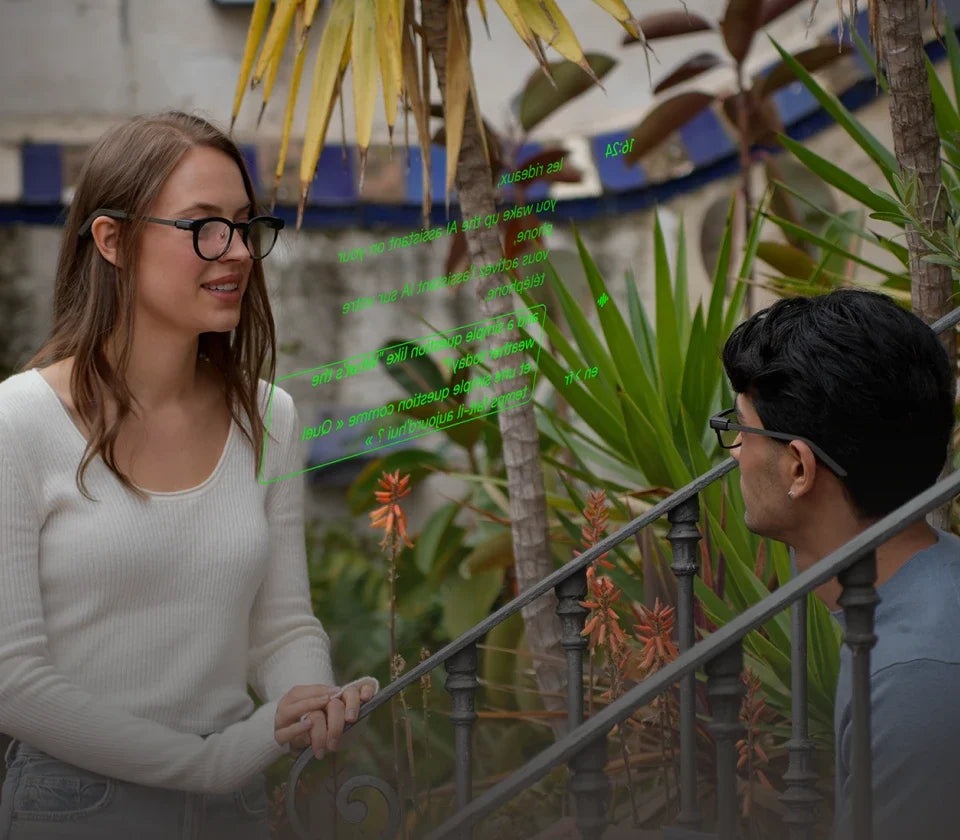
End the conversation, and the notes are already written. MemoMind One translates conversations in real time across 26+ languages — and finishes every session with an AI summary of what was said. The original and translation appear side by side on your phone; live text can follow on your glasses when you set it up.
How to Access: Customize Translator
Translator lives in the More menu by default. To move it to your main navigation for faster access, long-press the Translator card and drag it — just like moving an app icon on your phone home screen. Rearrange the cards to put your most-used features front and center, then launch Translator with one tap.
How to Start a Translation Session
Open Translator and pick your language pair — 53 languages are supported right now. Set the other person's language on the left and yours on the right; tap the swap arrows if you need to flip direction. Then press Start.
Note: You are suggested to select the pair before starting the MemoMind One Translator — this keeps translation accuracy high.
It translates meaning, not words: watch the text rewrite itself as a sentence fills in, and you get a clean, natural sentence instead of a word-by-word literal one.

Two Translation Modes: Bilingual & Translation
MemoMind One gives you two ways to translate, depending on the conversation.
Bilingual Mode (Two-Way)
Both people talk naturally, and both languages stream live in real time. You don't toggle who's speaking or press a button each time someone talks — the system picks up both sides automatically. This is the mode for meetings, travel interactions, and everyday conversations where both sides need to be understood.
Translation Mode (One-Way)
Designed for listening: as someone speaks in another language, the translation follows in real time. You're primarily receiving information — following a tour guide, listening to a lecture, watching a demo, or understanding family speaking another language. The conversation continues naturally while you follow along.
AI Capabilities: Live Notes & AI Tips
Before you start, you can turn on AI capabilities under the settings — two features that make translation more than translation:
-
Live Notes — an AI real-time summary of the conversation as it happens. Key points and topic summaries pop up at the top of your phone screen, so you can quickly grasp the core of what's being said without reading every line.
-
AI Tips — smart prompts and useful information surfaced from what's being said, helping you catch critical details and stay on top of the conversation rhythm.

With these on, the AI Summary that follows each session adapts to your conversation with styles that fit what was discussed — Summary, Main Topics, Useful Information, Preferences and Facts, Interesting Moments, People's Viewpoints, AI Suggestions, Mind Map, and more. A client call comes back with decisions and viewpoints; a brainstorming session comes back organized by theme.
Translation Interface: Language Switching, Audio Input Display
During a live session, the bottom function area gives you real-time control over several settings.
Switch Languages On the Fly
If a third person joins the conversation mid-session, you can seamlessly switch the language pair to match their language — no need to end and restart. This makes Translator flexible for group chats and multilingual meetings.
Choose Audio Input
You can select the audio input source:
-
Glasses — the glasses microphone picks up audio, best for close-range conversations and when you want to keep your phone in your pocket
-
Phone — the phone microphone picks up audio, best for longer distances or when the phone is placed between speakers
Mobile Display: Translation or Bilingual
The phone screen supports two display modes:
-
Translation — pure translation text only (default mode). Clean and focused on what you need to read.
-
Bilingual — original and translation side by side. Toggle this on when you want to compare the original with the translation, or when both speakers want to follow along on the same screen.

Independent Display Settings
Translator has its own Display settings panel, separate from system settings — adjust display distance, height, and brightness for the translation view. These parameters apply only to the Translator interface and don't affect Captions, Teleprompter, or any other feature.
You can also toggle auxiliary features on or off directly within the translation interface.
How to Pause and End a Session
Pause anytime — the translation stops, and your position is saved.
End with either:
-
The End button on your phone screen
-
A quick press of the temple button on the glasses
Both are responsive and easy to reach mid-conversation.
After the Conversation: AI Summary & Original Transcript
When you end a session, the system automatically saves the full conversation in two sections:
-
AI Summary — an auto-generated title, topic tags, and the conversation reorganized into structured sections (with the AI styles mentioned above when capabilities are on)
-
Original — the full bilingual transcript, every line, both languages, timestamped
For both sections, you can:
-
Share with one tap — send the summary or transcript via your preferred app
-
Delete if you no longer need the record
-
Regenerate the AI Summary if you want a fresh take on the same conversation
Everything stays in your History, so you can go back and review any past session. This pairs well with Memo AI for follow-up questions and deeper analysis of past conversations.
Translation Earbuds vs. Glasses
If you're comparing translation earbuds vs glasses, here's the practical difference: earbuds block one or both ears and require each person to wear one (or you to hand one over). Glasses keep your ears open — you hear the other person naturally and read the translation simultaneously. Nobody else needs to wear anything.
The summary is the differentiator: earbuds give you translation in the moment. MemoMind One gives you translation in the moment plus a structured write-up afterward — useful when the conversation matters beyond the exchange itself.
Related Blogs
More MemoMind stories from the same category.