AI Glasses Eye Strain: How Display Alignment Calibration Helps
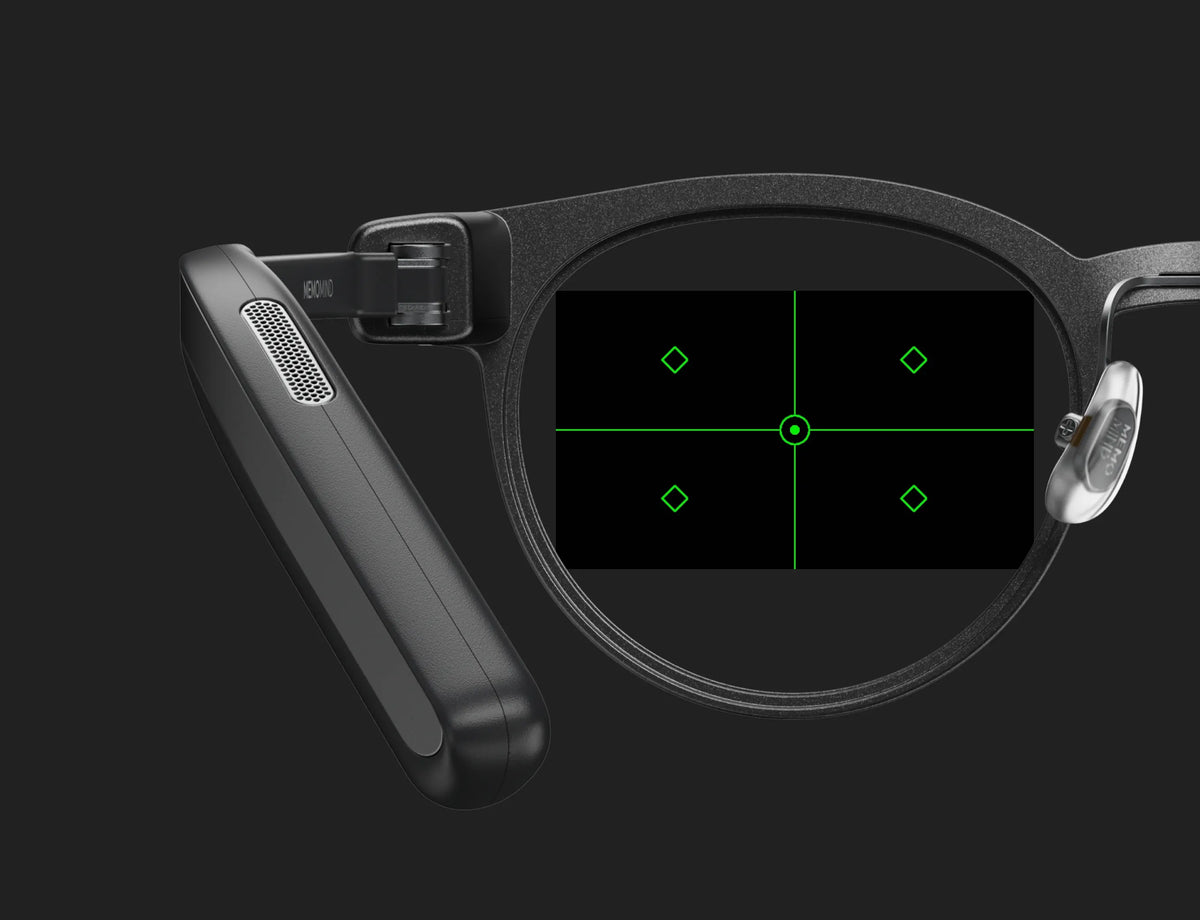
Quick Answer: AI glasses eye strain is not always caused by screen sharpness or display resolution. Small differences in vertical or horizontal display alignment can make smart glasses feel blurry or tiring over time. MemoMind One's Display Alignment Calibration lets users fine-tune each display position inside Memo Lab. It can help some users improve comfort, but persistent eye discomfort should be taken seriously and may require professional vision advice.
Why AI Glasses Can Cause Eye Strain
When people search for "AI glasses eye strain, smart glasses eye fatigue, or blurry smart glasses display", they often assume the problem is image quality.
Sometimes it is. A display may be too dim, too bright, poorly focused, or difficult to read outdoors.
But with binocular smart glasses like MemoMind One, your eyes are not looking at one screen. They are receiving two separate images, one for the left eye and one for the right eye, and your brain has to combine them into one comfortable view.
If the two images are slightly misaligned, the display can create a strange experience. That does not always mean the display itself is blurry. It may mean the two images are not landing in the most comfortable position for your eyes.
A Real MemoMind One Tester Case
CASE FILE NO. 001 — MEMO LAB
IN THE LAB
On June 25, we received feedback from an early MemoMind One tester @Dango about the prescription-lens PVT version.
Here’s what he experienced:
- Monocular (one eye closed): Sharp, clear, comfortable, no focusing problems.
- Binocular (dual‑screen, both eyes open): Mild persistent focus‑related eye strain.
- ECO mode (single‑screen, both eyes open): For this tester, discomfort became more noticeable unless he closed one eye.
The issue did not seem to be basic screen sharpness. Each eye could see the image clearly on its own. The discomfort appeared when the visual experience had to feel natural with both eyes open.
Before changing the software, we worked with Dango to rule out other possible causes. With guidance from our support team, he tried moving the virtual display distance from roughly 5 meters to 1 meter, swapping nose pads, adjusting frame tilt, and checking his prescription with an optometrist using both MemoMind One and a well-fitting pair of regular glasses.
Those changes helped slightly, but they did not fully resolve the discomfort.
That told us a fixed factory display position might not be enough for every user. Prescription lenses, wearing position, face shape, and individual binocular vision can all affect how comfortable a near-eye display glasses feels. So we built a display alignment calibration tool that lets MemoMind One users fine-tune the left and right display positions themselves.
Result Logged
It took only two minutes for the discomfort he had previously mentioned to almost completely disappear.
After we built the first version of the calibration tool, we sent it back to Dango for testing.
That wasn't the end of the experiment. We kept refining the experience based on what we learned—and the MemoMind AI glasses Display Alignment Calibration tool is now staying in Memo Lab.
*Special thanks to @Dango for sharing his testing experience and feedback, which helped us identify this pain point and shape the calibration feature.
How to Adjust MemoMind One Display Alignment
Connect your own AI glasses, open the MemoMind app, go to Settings → Device → Memo Lab, and follow the on-screen instructions to adjust the display.
For best results:
-
Keep both eyes open during calibration.
-
Adjust vertical alignment first.
-
Adjust horizontal alignment after vertical alignment feels comfortable.
-
Make small changes instead of large jumps.
-
After each adjustment, wait a few seconds and let your eyes settle.
-
Stop if the display becomes uncomfortable or causes pain.

Why This Feature Lives in Memo Lab
Display Alignment Calibration is not a feature every user will need.
For many people, MemoMind One will feel comfortable without manual display adjustment. For others, especially users with prescription lenses or more sensitive binocular vision, a fine-tuning tool can be useful.
That is exactly why this feature belongs in Memo Lab.
Memo Lab is where we test real-world ideas before deciding whether they should become part of the everyday MemoMind experience.
Display Alignment Calibration is not the only experiment. Since MemoMind One AI glasses debuted at CES 2026, our team has continued refining and optimizing the experience. We’ve also invited early testers and tech enthusiasts to try the product firsthand and share their feedback with us.
For example:
-
What if capturing what you see through AI glasses could be as simple as taking a screenshot?
-
What if AI glasses could connect to external intelligence beyond the app itself?
These questions have led to experiments like Screenshot and OpenClaw, which we will introduce to you in the next article.
FAQs
What is MemoMind One's Display Alignment Calibration?
Display Alignment Calibration is a Memo Lab tool that lets MemoMind One users fine‑tune the vertical and horizontal position of the left and right displays. It is designed to help the two images feel more naturally aligned when both eyes are open.
What is MemoMind’s Memo Lab?
Memo Lab is where MemoMind tests experimental features based on real user feedback. Some experiments may become part of the everyday MemoMind experience after they are validated and refined.
Can prescription lenses affect smart glasses comfort?
Yes. Prescription accuracy, lens fit, wearing position, and individual vision differences can all affect how comfortable smart glasses feel. If discomfort continues, it is best to stop using the device and consult an optometrist or eye care professional.
Related Blogs
More MemoMind stories from the same category.