Best Smart Glasses with Display in 2026: How to Choose
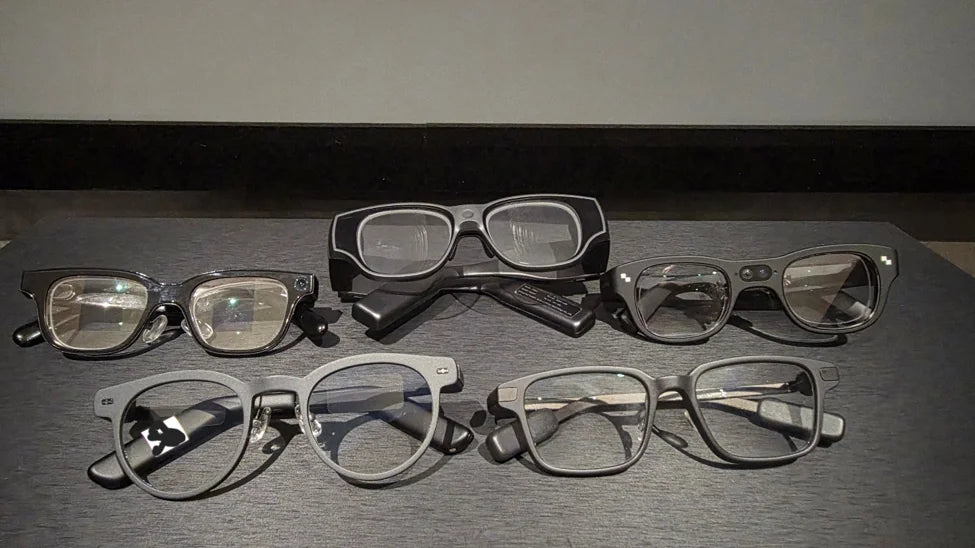
AI glasses with displays vary in how they deliver information, from standalone AR experiences to camera-equipped AI assistance and lightweight, camera-free displays.
This article compares seven common options for 2026: RayNeo X3 Pro, Meta Ray-Ban Display, Rokid Glasses, MemoMind One, Halliday G2, Even Realities G2, and RayNeo iO, helping you understand the trade-offs before choosing the best pair.
What Are AI Glasses with a Display
AI glasses with a display combine the functions of smart glasses with a visual layer that can show information in your field of view. Depending on the product, that can include notifications, navigation, translations, captions, teleprompter text, AI responses, or more immersive AR content. Full-colour displays, such as RayNeo X3 Pro and Meta Ray-Ban Display, can show maps and images. Monochrome green displays, used by most of the other glasses here, suit short text and simple icons, and they come in lighter frames.
Three Types of Smart Glasses with Displays
| Product | Display Colour | Resolution | FOV | Camera | Speakers | Weight | Battery Life |
|---|---|---|---|---|---|---|---|
| RayNeo X3 Pro | Full-colour | 640 × 480 | 30° | √ | √ | ~76 g | Not specified |
| Meta Ray-Ban Display | Full-colour | 600 × 600(right lens, monocular) | 20° | √ | √ | 68~70g | 6 hrs per charge; up to 24 hrs with case |
| Rokid Glasses | Green | 480 × 400 | 30° | √ | √ | 49g | 8 hrs |
| MemoMind One | Green | 600 × 350 | 25° | × | √ | 46.6g | 16+ hrs mixed use |
| Even G2 | Green | 640 × 350 | 27.5° | × | × | 36g | 2 days regular use |
| Halliday G2 | Green | 600 × 300 | 25.2° | × | √ | 49g | 12 hrs regular use |
| RayNeo iO | Green | Not specified | 23.5° | × | × | 33g | 2 days regular use |
Standalone AR Glasses: RayNeo X3 Pro
RayNeo X3 Pro is the closest to a self-contained AR computer. It has its own processor, operating system (RayNeo AIOS), two cameras, and spatial tracking, and it supports navigation, teleprompter, meeting notes, and third-party AR development. The cost is weight: at 76g it is the heaviest pair here.
Look at this type if you want spatial computing, richer AR interactions, or a more self-contained platform.
See more details here.
Camera + Display: Meta Ray-Ban Display and Rokid Glasses
Meta Ray-Ban Display puts a full-colour image in one lens and adds a Neural Band wristband for gesture control, starting at $799 in the US.
Rokid Glasses show green text to both eyes in a frame about 20g lighter, with translation, navigation, teleprompter, and removable prescription lenses.
Both pairs combine a display with a camera and open-ear speakers, so consider these if you want photo capture and spoken AI in one frame.
See more comparisons here.
Camera-Free AI Display Glasses
Camera-free glasses drop photo capture and camera-based visual AI, and they remove the recording question in meetings, classrooms, and workplaces.
MemoMind One is built for visual and spoken assistance in one frame, with Harman Audio EFX open-ear speakers, voice interaction, and memory-related AI features. It is a littleheavier than the Even G2 and RayNeo iO.
Even G2 is a light, text-first display with no speaker, so sound comes from your phone or earbuds. It covers teleprompter, translation, navigation, and notifications, and the optional R1 ring adds hand control.
Halliday G2 is aimed at meetings, with translation in 45+ languages, calls, music, and a Cheatsheet mode for notes.
RayNeo iO is the lightest pair here. It has no speaker, uses a physical Smart Crown for control, and adds live captions, meeting notes, lifelog, and teleprompter.
Choose this type if you want information in your field of view without a camera on the frame.
Compare MemoMind and Even G2; MemoMind and RayNeo iO here.
Four Factors to Compare Before Buying
Display Technology and Readability
Full-colour displays can present richer visuals, while monochrome green displays are commonly used for text, icons, notifications, and prompts.
Monocular displays place information in front of one eye, while binocular displays present it to both.
Field of view (FOV) describes the angular area occupied by the virtual image, but a wider FOV does not automatically guarantee more readable text. Resolution, optical clarity, text size, contrast, and display placement also matter.
Camera and Privacy
A built-in camera enables photo and video capture and may provide visual input for AI features. This can be useful when documenting an experience or asking AI to interpret something in front of you, but it also introduces privacy considerations in workplaces, classrooms, and public spaces.
Camera-free glasses cannot capture photos or video through a built-in camera. They may still use microphones for voice interaction, translation, or transcription, depending on the model. If recording restrictions matter in your daily routine, check the device's hardware, recording indicators, and controls rather than relying on the product category alone.
Audio and Interaction
Built-in speakers allow glasses to play spoken AI responses, calls, music, and navigation prompts without separate earbuds. Open-ear audio leaves the ear canal unobstructed, although sound leakage and listening quality vary by design and volume.
Models without built-in speakers generally rely on a connected phone or external audio devices for sound. They can still offer display-based features, but the interaction feels different.
Control methods also matter. Voice commands, temple buttons, physical crowns, gestures, and optional rings each suit different situations. If you often use glasses in noisy environments or need to interact discreetly, test the control method before choosing.
Phone Dependence and Developer Support
Some smart glasses run an onboard operating system and handle more functions directly on the device. Others rely more heavily on a companion phone for connectivity, settings, AI processing, or access to specific features.
If you want to build custom applications, look beyond general AI features. MemoMind provides a development route for glass-side and phone-side plugins, with documented hardware interfaces and input protocols. RayNeo X3 Pro and Even G2 also list developer capabilities. Before choosing a platform, confirm the current SDK availability, supported hardware, testing requirements, and any restrictions on background services or connectivity.
Which Glasses Fit Your Situation
When you need translation. Choose a pair with built-in speakers if you want to hear the translation as well as read it: MemoMind One, Rokid Glasses, Meta Ray-Ban Display, or RayNeo X3 Pro. Even G2 and RayNeo iO show text only. The translation language counts above measure support, not quality, so test your own language pair.
When you give talks. Nearly every pair here has a teleprompter, so the difference is how the text moves. Even G2 and MemoMind One offer AI, automatic, and manual scrolling, including a mode that follows your speech. Meta Ray-Ban Display shows your script as text cards that you advance with Neural Band gestures.
When you navigate. Check three things: whether the glasses support navigation, whether it runs in a built-in app or depends on your phone, and what the display can show, such as a map, turn arrows, distance, or arrival time. MemoMind One, RayNeo X3 Pro, Meta Ray-Ban Display, and Even G2 have built-in navigation. Check that your city and route type are supported before you buy.
When you want to capture what you see. Meta Ray-Ban Display, Rokid Glasses, and RayNeo X3 Pro each list a camera, which brings photo and video capture and camera-based AI. It also brings recording restrictions at some workplaces and schools. If you want a display without a camera, the camera-free pairs above are the alternative.
When you wear them all day. Start with weight, from 33g on RayNeo iO to 76g on RayNeo X3 Pro, then check the fit: temple pressure, nose pads, and frame balance decide how it feels after a few hours. Then compare the battery claim against your day.
When you need prescription lenses. If you rely on prescription glasses, check lens compatibility before comparing other features. MemoMind One supports single-vision prescriptions, while Rokid Glasses use removable prescription lenses and Halliday G2 lists prescription options.
So, before you choose, shortlist with the table, then confirm fit, prescription support, and availability in your region.
Related Blogs
More MemoMind stories from the same category.