How to Build Apps for Smart Glasses: MemoMind Developer Platform Demo
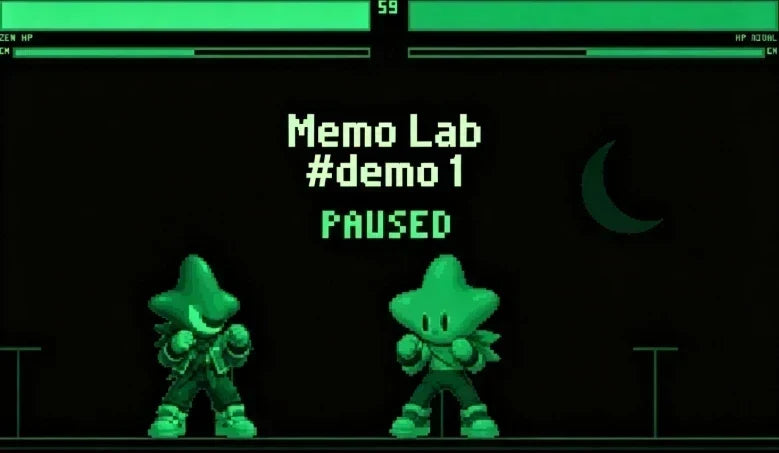
In our Memo Lab announcement, we said we'd keep sharing protocol updates, reference code, and demo apps as the developer platform grows. Today we're sharing the first one: a live, working demo running on MemoMind One.
Here's the short version: your glasses and your phone aren't running two separate apps. They're running two halves of the same app, talking to each other in real time—one half on the glasses, one half on your phone. This demo is our first public proof that the pairing actually works.
Fighter Arena: A Fighting Game on Smart Glasses
The demo is a 2D fighting game called Fighter Arena, starring Xgimi IP characters. It's single-player against the CPU, and it runs right on the glasses' HUD at their native display resolution (600×350) at 20 fps. Audio plays over Bluetooth HFP—the same hands-free profile your car uses for phone calls, just repurposed for game sound.
The game runs live on the glasses while a phone plugin acts as the controller: start, pause, and two skill buttons. A normal fighting game needs a joystick and six buttons; we cut that down to four. START and PAUSE control the flow, and SKILL 1 / SKILL 2 trigger moves directly—no directional inputs to fumble with.
How AI Glasses and Phone Work Together
The game itself isn't really the point—it's a stand-in for any app you might build on your own MemoMind display glasses.
What matters is what's happening underneath: the glasses run a small app written in C that draws the HUD and handles input in real time (C is fast and predictable, which matters when every frame counts). Your phone runs a companion plugin written in JavaScript—the same language most app UIs are built in, so it's quick to iterate on.
Your phone sends button presses to the glasses over Bluetooth; the glasses render the next frame; audio flows back the other way, from the glasses to your phone or the glasses' own speaker.
Two devices, one experience, running live.
And phone buttons aren't the only option—the platform also reads head motion and accessory buttons, so a future app could be controlled by tilting your head or clicking a separate device instead of tapping a screen
Memo Lab: The MemoMind SDK Toolkit
This demo is a sneak peek at what's coming in Phase Two: the Full SDK and Memo Lab, the developer workbench built into the MemoMind app. Once it's live, you'll find a developer entry where you can import and run your own apps. Here's what you'll get:
-
A packaging format — .mmpkg for full paired apps (glasses + phone together), or .gmp if you only need to build for the glasses side.
-
A build toolchain —a GCC toolchain and headers for the glasses side, plus JavaScript support for the mobile plugin. You can build UI directly on the glasses side for better performance, or generate it on the phone and push it to the glasses as an image—whichever fits your app better.
-
A simulator — it emulates the HUD, buttons, microphone, speaker, and IMU (head motion), showing the phone controller and glasses HUD side by side, so you can test without touching real hardware. If it runs in the simulator, it runs on the glasses.
Once you're ready, you package your app, import it into Memo Lab, and tap to run—both halves load together. Packaged apps can also be shared with other users for testing. How many you can keep in My Build depends on your phone's storage, and only one app runs at a time.
MemoMind SDK Beta Access Timeline
Phase Two starts with an invite-only whitelist before opening more broadly. We're targeting mid-October for beta access through our Discord channel; exact criteria and timing will be announced officially closer to launch. The ecosystem is already moving, too—on September 1, we opened developer access and welcomed KiWear as our first SDK ecosystem partner, who's building a smart ring to control MemoMind One.
We'll keep sharing demo apps, reference code, and protocol updates as the platform grows. This fighting game is just the first one.
So—if you got early access to the SDK tomorrow, what's the first app you'd build for MemoMind One?
Related Blogs
More MemoMind stories from the same category.