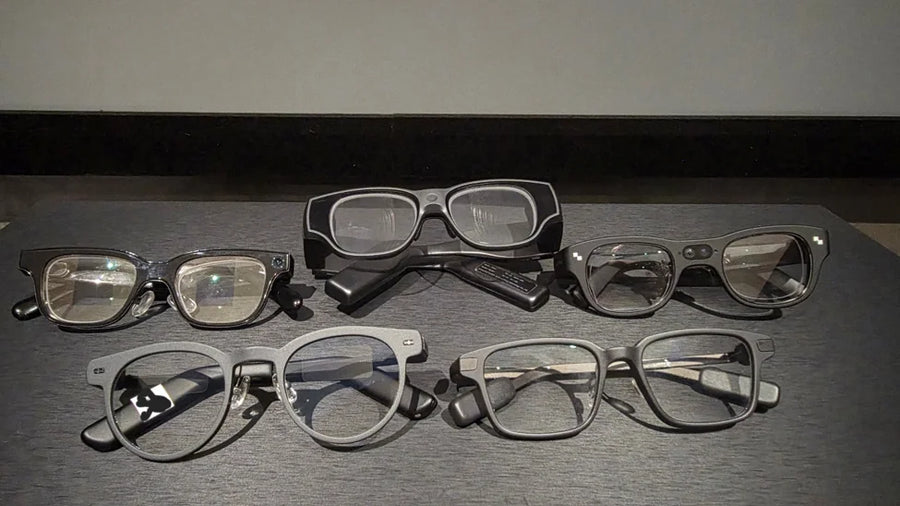
Smart glasses come in different forms. Some provide AI assistance through voice, some display information in front of your eyes, and others place digital content within a view of the physical environment. Because these capabilities can overlap, product labels alone can make comparisons confusing.
The key is to understand what each term describes and then look at the features the device actually supports.
What Can Each Type of Smart Glasses Do
AI Glasses
AI glasses focus on assistance. Depending on the model, they can answer questions, translate speech, provide captions, record information, summarize conversations, or help with calls. Some use audio alone; others include a small display for reading short responses or prompts.
A display can be useful when listening isn't practical, such as in a noisy environment or when you want to glance at a translation without playing it aloud. But HUD-style is designed for brief information, not a full virtual monitor or immersive 3D content.
AI glasses can have cameras, but they don't have to. Camera-equipped models like Ray-Ban Meta can support photography, video recording, or visual AI features that interpret what you're looking at. Voice-based assistance and audio translation like MemoMind One can work without one, depending on the software and hardware.
AR Glasses
AR glasses bring digital content into your view of the real world, but not all AR-style products do this in the same way.
Screen-style glasses create a large virtual screen for activities such as watching videos, gaming, or working with a connected computer. Many use 3DoF tracking to keep the screen stable as you turn your head. For example, the XREAL One Pro supports a virtual display with native 3DoF tracking, while the Rokid Max 2 can provide a large virtual screen for compatible phones, computers, and gaming devices. These experiences can make a screen easier to view, but a stabilized virtual screen does not necessarily mean digital content is anchored to the physical environment.
Spatial AR glasses can position virtual content relative to the surrounding environment. For example, the XREAL Air 2 Ultra supports 6DoF tracking and spatial features such as plane tracking and spatial anchors. The RayNeo X3 Pro also supports 6DoF and SLAM in Creator Mode, allowing developers to build AR experiences with spatial positioning and environment mapping. These capabilities can support experiences such as placing virtual objects in a room or keeping digital content positioned as you move around it, depending on the software and application.
DoF stands for degrees of freedom. In this context, it describes how a system tracks movement to position virtual content. 3DoF tracks rotation; 6DoF tracks both rotation and movement through space. A 0DoF display does not use head-pose tracking to stabilize the image as you turn.
XR Glasses
XR stands for extended reality, an umbrella term that includes AR, VR, and MR.
VR replaces your view of the real world with a virtual environment. AR adds digital content to your view of the real world. MR generally involves a closer interaction between digital content and the physical environment, such as virtual objects that are positioned in relation to real surfaces.
In the smart glasses market, however, XR is also used as a product category label, particularly for glasses that create virtual screens. The label alone doesn't tell you whether a product offers 3DoF tracking, 6DoF spatial positioning, or any particular level of interaction with the environment.
For example, a pair of glasses marketed as XR may be designed primarily for viewing a virtual monitor, while another may support spatially anchored objects. Check the tracking method, display behavior, and supported software to understand the difference.
What Else You Can Compare
AI, AR, and XR tell you what a pair of glasses is built to do. These things tell you what it’s like to live with.
Display
Field of view (FOV) is how much of your view the image fills, and it follows what the glasses are for. MemoMind One’s display covers 25° and shows green monochrome text at 600×350, which suits short captions and prompts. The XREAL Air 2 Ultra covers 52° with a 1080p image per eye, which suits video and virtual screens. RayNeo X3 Pro sits in between at 30°, but in full color. A wider FOV isn’t automatically better. A text-only display doesn’t need one, and resolution and brightness matter just as much.
Connection
Screen-style glasses such as XREAL One Pro take video over USB-C from a phone, PC, or game console, so the connected device does the work and the glasses are the screen. Many AI glasses are designed with the initial goal of helping to reduce reliance on smartphones. Some spatial AR glasses carry their own processor. RayNeo X3 Pro runs on a Snapdragon AR1 chip and is marketed for navigation and translation without reaching for your phone.
Weight and comfort
AR and XR glasses tend to be somewhat heavier than AI glasses with a HUD, but not by much. MemoMind One weighs 46.6 g, and Meta Ray-Ban Display weighs 69 g. XREAL lists the Air 2 at about 72 g and the Air 2 Ultra, with its tracking sensors, at about 80 g, both without the cable. XREAL One Pro weighs 87 g, and RayNeo X3 Pro weighs 76 g. VR and mixed reality headsets are in a different league: Meta Quest 3 weighs 515 g. Weight distribution, nose-pad pressure, and prescription support also affect comfort.
Price
Price follows capability. IDC puts the average smart glasses price around $376 in 2026, display glasses from XREAL, Viture, and RayNeo at roughly $516 to $547, and the most sophisticated models well above $1,000.
For a product-by-product comparison of display types, cameras, audio, weight, and phone dependence, see Best Smart Glasses with Display in 2026: How to Choose.
FAQs
What is the difference between AI, AR, and XR glasses?
They describe different things. AI is what the glasses can do for you, like answering questions and translating. AR is how digital content relates to the real world. XR is the umbrella term for AR, VR, and mixed reality.
What is the difference between a HUD and AR glasses?
A HUD keeps information in a fixed spot in your view. AR glasses can keep content anchored in the room, so it stays there when you turn your head or move.
Do AR glasses need a camera?
For content that stays fixed as you walk around (6DoF), usually yes. Glasses that only track head rotation (3DoF) can hold a virtual screen steady without one.
Is XR the same as AR?
No. XR is the umbrella term, and AR is one part of it, along with VR and mixed reality. Some brands also use XR for glasses that show a large virtual screen.
Is MemoMind One AR glasses?
No. MemoMind One is AI glasses with a green monochrome HUD and a 25° field of view. The text stays in a fixed spot in your view, and the glasses have no camera and don't map the room.